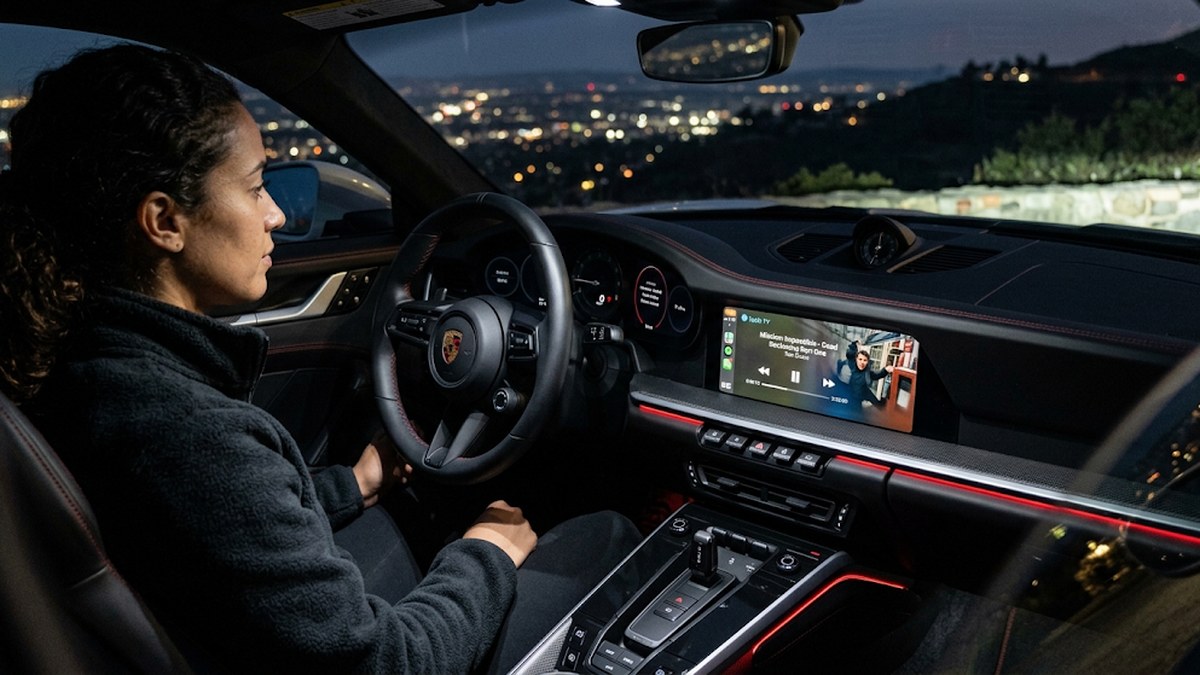
iOS 27 arrived with a genuine first for CarPlay: a video app category that has never existed before. Apple demoed it on stage, at least one real app has committed to it, and the framework is not a rumor. If you updated expecting your screen to suddenly play video, though, you are very likely looking at the exact same interface you had before — and that is not a sign anything is broken.
The gap between 'Apple shipped this' and 'you can use this' is unusually wide for a headline iOS feature, and it comes down to one thing that has nothing to do with your phone: the car itself has to opt in. Apple built the door; car manufacturers have to unlock it, one model at a time, and at launch essentially none had.
This guide separates what is real from what was only a keynote demo, tells you exactly how to check whether your specific car qualifies, and covers what you can actually watch — parked — while you wait.
You are in the right place if
- You updated to iOS 27 expecting a CarPlay video option, and the screen looks exactly the same as before
- The Apple TV app plays sound in the car but never shows a video screen
- There is no 'video' or 'parked' setting anywhere in CarPlay's menus
- A friend's car shows something yours doesn't, on what looks like the same iPhone software
The 60-second fix
- Confirm you are actually on iOS 27 — Settings > General > About — since this feature does not exist on iOS 26 or earlier no matter what you try.
- Update the Apple TV app specifically. It is the only app Apple confirmed works with this at launch.
- Accept, before troubleshooting further, that this depends on your car manufacturer turning it on — and as of iOS 27's release, essentially none had.
- Check your car's screen and head-unit specs against Apple's minimums rather than assuming a setting is hidden somewhere.
What iOS 27 actually shipped, versus what was only a demo
At its developer conference, Apple showed a video app called Landmark playing content on a car's main screen. Landmark is not a real app — it was built to demonstrate the capability, the same way Apple has used placeholder apps in past keynotes. The real, confirmed app is the Apple TV app, which Apple has said will support video playback in CarPlay once a compatible car is available.
Underneath the demo, the technology is real: CarPlay gained an actual video app category for the first time, built on the AirPlay streaming pipeline Apple introduced in iOS 26.4. That is a meaningful technical change, not a cosmetic one — but shipping the capability in iOS is only half of what is needed to see it in your car.
- The video category is entirely new to CarPlay — earlier iOS versions have no equivalent, so nothing you missed in settings would have unlocked this before.
- Apple TV is the only app confirmed at launch; other streaming apps would need their own CarPlay video updates, and none had announced one at the time of writing.
- Playback is parked-only by design — the system is built to fall back to audio automatically the instant the car moves.
The real reason your screen is still black: your car, not your phone
This is the part that catches people out, because everything about the update looks finished on the phone side. iOS 27 installs normally, the Apple TV app updates normally, and nothing on your iPhone tells you anything is missing. The missing piece sits entirely on the car's side of the connection.
Car manufacturers have to add explicit support for CarPlay video to their infotainment software — it is not something that turns on automatically just because your phone supports it. At the time iOS 27 launched, no automaker had announced that any model supports it yet. If that is still the case when you are reading this, no combination of settings, restarts, or cable swaps on your end will produce a different result.
The hardware most cars do not meet yet, even if the manufacturer wanted to add it
Even a manufacturer motivated to support this quickly runs into hardware requirements that plenty of existing cars, including recent ones, do not meet. This is not a software toggle a car maker can flip with an over-the-air update in every case — some of it depends on the screen and chip that shipped in the vehicle.
- A display resolution of at least 1920 x 1080 — many current infotainment screens run lower than that.
- Hardware decoding support for H.265 / HEVC video, which older head units were never built with.
- At least 4GB of RAM in the CarPlay-connected system, a meaningfully higher bar than many existing units carry.
- The AirPlay-based streaming pipeline introduced in iOS 26.4, which the car's own software stack has to support.
How to actually find out if your car qualifies
- Search your exact make, model and model year plus 'CarPlay video' — manufacturers announce this kind of support through press releases and owner communications, not inside CarPlay itself.
- Check for a pending infotainment or head-unit software update through your car's own settings menu, separate from your phone.
- Call or check with your dealer's service department directly — for a launch-year feature like this, they often have more current information than what is published online.
- Search owner forums for your specific model. Real owners tend to report working configurations, exact software versions, and gotchas faster than official channels do.
If your car does support it: what to expect
Assuming your manufacturer has enabled it and your hardware clears the bar, the behavior is straightforward. Open the Apple TV app through CarPlay while parked, and a video option should appear where previously you would have only seen a Now Playing audio card.
The system is designed to guard against driver distraction automatically: the moment the car starts moving, playback switches to audio-only without you needing to do anything. That is expected behavior, not a bug to fix.
- Confirm the car is fully parked, with the transmission out of Drive, before testing — some vehicles require the parking brake engaged specifically.
- Open the Apple TV app from the CarPlay home screen rather than starting playback from the phone first.
- If the video option still does not appear despite meeting every requirement above, check for a car software update one more time before assuming it is a bug — manufacturer rollouts are often staggered by region and model.
What you can actually watch, parked, while you wait
None of this is new territory — people have wanted parked video in cars for years, and there are established, reliable options that do not depend on your manufacturer's roadmap.
- Many cars already support video from their own native media system — a USB stick or built-in browser, separate entirely from CarPlay, usually unlocked only when parked.
- Rear-seat screens, where fitted, are unrestricted in most vehicles since they sit outside the driver's view.
- A tablet on a headrest mount remains the simplest and most reliable option for passengers, and it sidesteps every requirement covered above.
- For the full picture on what does and does not work through CarPlay and Android Auto today, including audio routing problems that look like video problems, see our companion guide.
Questions people still ask
Can I watch Netflix or YouTube on CarPlay now that iOS 27 is out?
Not yet, and not through those specific apps. Apple TV is the only app confirmed to support CarPlay video at launch. Other streaming services would need to release their own updates to use the new video category, and none had at the time of writing.
Why does the Apple TV app not show a video option in my car?
Almost always because your car manufacturer has not enabled CarPlay video support yet, or your specific head unit does not meet Apple's hardware requirements. Both are independent of your phone and your iOS version once you have confirmed you are on iOS 27.
Do I need to buy a new car to get this feature?
Not necessarily. Support depends on software your manufacturer adds to the car's infotainment system, which can sometimes reach existing vehicles through an update — but only if the underlying screen and chip meet Apple's minimum specs, which is not guaranteed on older hardware.
Will CarPlay video play while I am driving?
No — the system switches to audio-only automatically the moment the car is in motion, for the same driver-distraction reasons that kept video off CarPlay entirely until now.
How do I know when my car's manufacturer adds support?
Check your manufacturer's press releases and owner communications, watch for an infotainment software update in your car's own settings, or ask your dealer's service department directly — CarPlay itself will not notify you.
Is this the same as the video workarounds people used before iOS 27?
No. Earlier options — USB media on the car's native system, aftermarket adapters, rear-seat screens — are separate systems that do not rely on Apple or your car manufacturer adding anything new. They still work exactly as before and remain the reliable fallback while official support rolls out.
You may also like
Problems that usually show up alongside this one.
 PhonesVideo on CarPlay and Android Auto: what actually works, and why your screen stays blackWhy both platforms block video by design, what your car can legitimately play while parked, and the real fix for audio that cuts out or refuses to route.
 Printers & devicesBluetooth won't connect or keeps cutting out: the fixes in orderWhy your earbuds connect to the wrong device, what causes audio to stutter in a crowded room, and the forget-and-repair trick that fixes most of it.
 PhonesWhy your phone battery drains so fast — and how to get the day backFind the app that is quietly eating 40% of your battery, fix the three settings that cost the most, and learn when the battery itself is the problem.
 PhonesPhone storage full? Free real space without deleting a single photoThe hidden cache, the duplicate downloads and the 'Other' category that eats 20GB — where your storage really goes and how to reclaim it.